

Blog
AirTag vs QR tag: which actually gets a lost item back?
These two products get compared constantly, and the comparison is usually framed wrong, as if they were two brands of the same thing. They are not. They are two different theories about what goes wrong when you lose something, and the right choice depends on which theory matches your life. I make one of them, so read accordingly, but I will try to call this straight.
Two philosophies
An AirTag believes the problem is that you do not know where your item is. It is a $29 disc that reports its location through Apple's Find My network, drawing on nearly every iPhone in the world. Open the Find My app and there is your bag on a map. Nearby, it can play a sound and, with a recent iPhone, guide you to it with Precision Finding. It runs on a replaceable coin cell battery for about a year. It is silent, passive, and excellent at answering "where."
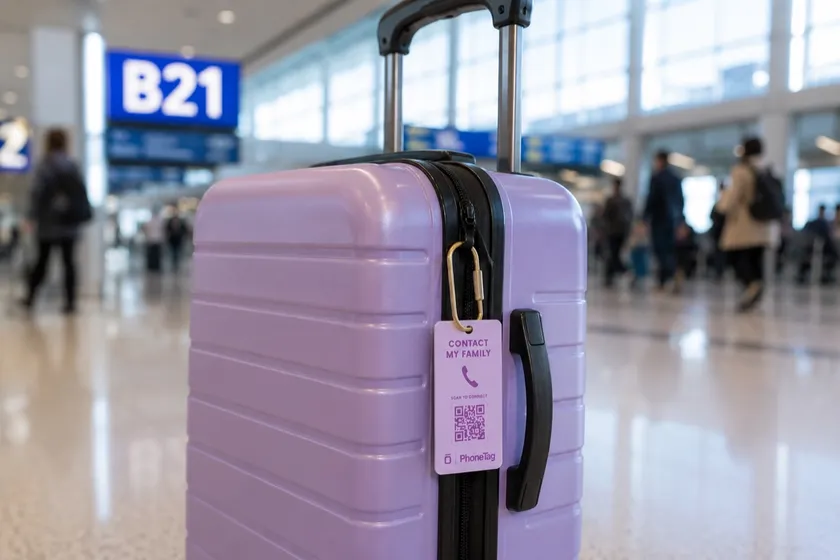
A QR tag believes the problem is that the person standing next to your item cannot reach you. It has no radio and no battery. It does nothing at all until a human picks up your item and scans the tag, and then it does the one thing a tracker cannot: it opens a channel between the finder and you. With PhoneTag specifically, the finder points their phone camera at the tag and a private live video call to you opens in their browser. Any phone, no app, no account, and your phone number is never shown. It is excellent at answering "who has it, and how do we get it home."
Notice what each one cannot do. The AirTag gives the finder no way to contact you unless you enable Lost Mode and choose to publish a phone number to whoever taps it. The QR tag cannot tell you your bag is under seat 14 if nobody ever picks it up. Every lost item story is won or lost in that gap, so let's run three real ones.
Scenario 1: the backpack left on the school bus
Your kid gets off the bus, the backpack does not. This is the most common lost item event in family life, and it is worth walking through slowly.
With an AirTag: that evening, Find My shows the backpack at the bus depot across town. This is genuinely useful information, because you know it was not stolen and you can stop searching the house. But now what? You cannot walk into a bus depot and rummage through vehicles. You call the transportation office in the morning, describe the bag, and wait while someone checks. The AirTag found the bag. It did not return it.
With a QR tag: the driver sweeping the bus at the end of the route picks up the backpack and scans the tag, because a tag that says "scan to reach the owner" gives a well meaning adult something to do with their good intentions. Your phone rings, you see the driver holding the bag, and you arrange for it to ride back on the morning run. The whole exchange takes a minute, and the driver never sees your number.
Honest call: the QR tag wins this one, but only if the driver actually scans, and the AirTag's location report is a comfort either way. Kids' gear lives in a world full of drivers, teachers, and coaches who want to help. Tags that give them a way to act convert that goodwill into a returned bag.
Scenario 2: the jacket left at the playground
With an AirTag: if you notice the same afternoon, this is the AirTag's best case. The map shows the jacket still at the park, you drive back, and Precision Finding leads you to the fence rail it is hanging on. Done. The risk is time: if another family carries the jacket to a bench or a lost and found first, you are now tracking a moving target into someone else's hands, and the anti-stalking protections that guard against misuse may make the AirTag start announcing itself to whoever has it.
With a QR tag: nothing happens until a person intervenes, so if the jacket hangs on the fence untouched, the tag is no help tonight. But the person who does eventually pick it up, a parent doing a sweep at dusk or a city employee opening the gate at dawn, scans it and reaches you directly. The jacket never enters the anonymous limbo of a municipal lost and found.
Honest call: if you notice quickly, the AirTag is better here. If hours pass before anyone acts, the QR tag is what saves the jacket. This scenario, more than any other, is why the two products are complements rather than rivals.
30-day money-back guarantee.
Scenario 3: the luggage that flew without you
With an AirTag: this is the use case that made AirTags famous. Your bag missed the connection, and while the airline's system says "delayed," Find My says the bag is sitting at the wrong airport. Travelers regularly use that location to give the airline precise, undeniable information about where their bag actually is. For air travel, the AirTag is the strongest tool in this whole article.
With a QR tag: in the airline system, your bag already has a tracked barcode tag, so the QR tag is redundant right up until the airline's process breaks: the paper tag tears off, the bag is set aside, or it lands in an unclaimed baggage room. At that point every recovery depends on a human handling an anonymous bag, and a scannable tag on the handle turns that human into a phone call. It also covers all the luggage moments that never touch an airline: the bag left in a cab, at a hotel, on a train platform.
Honest call: AirTag first for flyers, no contest. The QR tag is the backstop for the failure modes the barcode system misses.
So which one gets your stuff back?
Score the scenarios and the pattern is clear. The AirTag dominates when the item is stationary in a place you can reach, or when a big logistics system needs to be told where your bag is. The QR tag dominates when the item is in a person's hands, which is where kids' gear almost always ends up. Locating and recovering are different jobs, and each product does one of them well.
They are complements. If you can, put an AirTag inside the bag and a scan to call tag on the outside of it, and you have covered both failure modes for under a hundred dollars. If you are buying only one, ask what your real problem is. If it is "I never know where my stuff is," buy the tracker. If it is "my kid's stuff disappears into lost and founds and other people's houses," buy the tag that lets the finder call you.
The tag the finder can actually use
Family Plan: $59 a year, 2 smart tags included. Video calling and the AI assistant included. Extra tags $12. 30-day money-back guarantee.
Learn moreCommon questions
Does an AirTag let a finder contact the owner?
Only if the owner has put the AirTag in Lost Mode and chosen to share a phone number. A finder who taps the AirTag with an NFC capable phone then sees that number. There is no way for a finder to call the owner without the owner exposing contact details.
Does a QR tag track location like an AirTag?
No. A QR tag has no radio and no battery, so it cannot report where it is. It only does something when a person scans it, which is exactly the moment a finder is trying to return your item.
Which is better for a kid's backpack, an AirTag or a QR tag?
Kids' gear is almost always picked up by someone nearby: a teacher, a coach, a bus driver, another parent. That favors the QR tag, because the person holding the bag can reach you immediately. An AirTag still helps you see where the bag ended up, and the two work well together.
Which is better for luggage?
For airline luggage, the AirTag's location report is genuinely powerful, because a bag can sit in a back room where no one scans anything. A contact tag earns its keep when the airline's own tag fails and a person finally handles the bag. Frequent flyers often use both.
Is the finder's call on a PhoneTag private?
Yes. The finder scans the tag and a live video call opens in their browser, with no app and no account. The call is routed through PhoneTag, so your phone number, name, and address are never shown to the finder.